

TLDR: Standard ChatGPT is great for quick one-off questions. Projects remembers context across sessions for ongoing client work. Custom GPTs let you build repeatable tools your whole team can use. For most agency folks doing regular work for one client? Projects is probably your new best friend.
Btw. Anthropic Claude and Google Gemini also have the projects feature.
When I first started using Generative AI tools, I regularly found myself explaining our client’s industry (giving context) to ChatGPT in order to get half decent results.
Same client. New project. Same background context. Copy, paste, wait, repeat.
There had to be a better way.
Turns out there is. Three ways, actually.
Most people are still using ChatGPT the same way for everything. Open a new chat, type a question, get an answer. But OpenAI has built two other approaches that work very differently.
Choosing the right one for the task can save you hours of repetitive setup. Let me break down when to use each.
The Quick Comparison
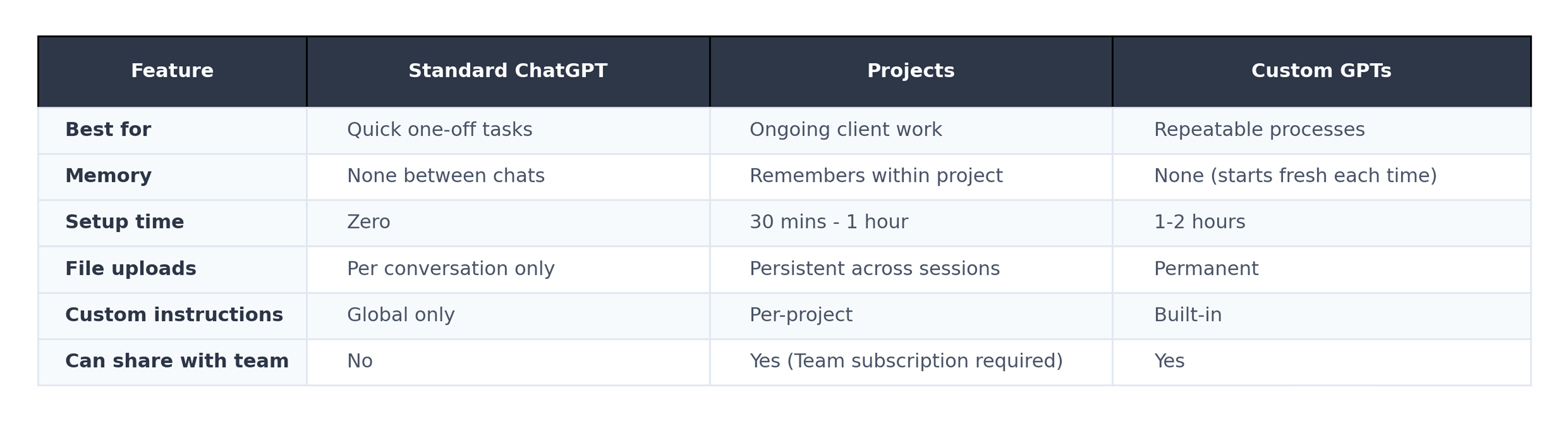
Option 1: Standard ChatGPT
This is what most people use. Open a new chat, ask your question, get your answer.
For example, for something like competitor research: You might type “Research the top 3 competitors for a sustainable fashion brand.” You’ll get decent results. But next week when you need more detail? You’re starting from scratch.
The good stuff:
Zero setup. Just start typing.
Perfect for genuinely one-off questions.
Full access to web search and deep research.
The not-so-good:
You need a decent prompt for half-decent results.
No memory between sessions.
You’ll re-explain client context every single time.
Any files you upload disappear when you close the chat.
Use it for: Quick questions during a client call. Brainstorming session starters. Anything you won’t need to revisit.
Option 2: ChatGPT Projects
Think of Projects as workspace folders within ChatGPT. They launched in December 2024 and are now available to everyone, including free users.
For competitor research: Create a project called “Client X - Competitor Intel.” Upload their brand guidelines, competitor list, and last pitch deck - don’t forget to add project instructions. Now, every conversation in that project starts with full context already loaded.
Ask “What’s new with Competitor Y?” and ChatGPT already knows the whole landscape. No re-explaining needed.
The good stuff:
Remembers context across all conversations in the project.
Upload reference files once, access them forever.
Set custom instructions per project (like your research methodology).
Share with your team. Up to 100 collaborators (if you have a ChatGPT team subscription)
Keep client data isolated with project-only memory
!!Important!!

Make sure you know your company policies around use of GenAI and client projects.
The not-so-good:
Full features need a Plus subscription or Team subscription
Memory works more like sticky notes than complete archives.
You can’t use Custom GPTs inside a Project.
Use it for: Ongoing client projects. Multi-week campaigns. Pitch prep where context matters.
Tip: Whenever you create an output you’re happy with. Pop it back into the project files to give it even more context.
Option 3: Custom GPTs
Custom GPTs let you build a specialised AI assistant with preset instructions and knowledge files baked in.
For example. My Digital Project Manager GPT, Appraisal GPT and UX Surgeon GPT
For competitor research: Build a “Competitor Analyst” GPT with your agency’s research framework already loaded. Upload your SWOT template, competitive dimensions checklist, and analysis methodology. Anyone on your team can use it for any client. Consistent output every time.
The good stuff:
Create once, reuse forever.
Enforce consistent methodology across your team.
Share with colleagues or even clients.
Great for standardised deliverables.
Make yourself look really clever to your colleagues
The not-so-good:
No memory between sessions. This is the big one. Each conversation starts fresh.
Limited to 20 knowledge files.
Setup takes more time upfront.
Users need a paid subscription to access your GPT.
Use it for: Templated processes. Team-wide tools. Client-facing assistants where consistency matters more than memory.
So Which Should You Actually Use?
Here’s my simple decision tree:
Is this a one-off prompt or set of prompts? Use Standard ChatGPT.
Will you work on this client or project repeatedly? Use Projects.
Do you need the same process for multiple clients? Build a Custom GPT.
Do you need your team using consistent methodology? Custom GPT.
Do you need memory and context to persist? Projects. Custom GPTs don’t do this.
The combo approach works well too. Use Projects for ongoing client work. Build Custom GPTs for standardised agency processes that apply across clients.
Your Next Step
Pick your most active client. Create a Project for them in ChatGPT (or your company sanctioned LLM of choice).
Upload their brand guidelines, tone of voice, work examples, recent briefs, competitor research etc. Start your next project-related task from there.
Then come back and tell me how many hours you saved this month.
Email me at tim@thewashup.club
I’d love to hear how it goes.